
Introduction
Request and receive verifiable credential presentations from Proof's cloud identity wallet using OpenID4VP with SD-JWT VC.
This guide describes how relying parties (verifiers) integrate with Proof's cloud identity wallet to request cryptographic proof of a user's identity. Proof issues SD-JWT Verifiable Credentials to users who complete identity verification through Proof Identify. Relying parties can then request a verifiable presentation of those credentials — receiving only the claims they need — without ever handling the raw credential itself.
The integration uses the same-device flow, where the user's browser is redirected from your application to Proof, the user authenticates and consents, and Proof redirects back with a vp_token.

Key Concepts
| Term | Definition |
|---|---|
| Relying Party | Your application that needs to verify a user's identity. Acts as an OAuth 2.0 Client in the OpenID4VP flow. |
| Proof Cloud Wallet | Proof's server-side wallet that stores SD-JWT VC credentials issued during identity verification. |
| SD-JWT VC | Selective Disclosure JSON Web Token Verifiable Credential. Allows the holder to reveal only specific claims. |
| VP Token | The verifiable presentation returned to the relying party. Contains the SD-JWT with selected disclosures and a Key Binding JWT. |
| Key Binding JWT | A JWT signed by the holder's key binding the presentation to a specific verifier and session. |
| Transaction Data | Arbitrary data submitted by the verifier that gets cryptographically bound to the presentation via the holder's key. |
How It Works
As a relying party, you don't need to know whether a user has already verified their identity with Proof. You simply redirect the user to Proof's authorization endpoint, requesting a verifiable credential presentation — Proof handles everything else, including first-time enrollment if needed.
One integration, two paths: Your authorization request is identical regardless of whether the user is new or returning. Proof detects the user's enrollment status and routes them through the appropriate experience automatically.
Path A: New User (Not Yet Verified)
If the user does not yet have a digital identity credential with Proof, they are guided through the full identity verification flow before a presentation is generated. From your perspective, the redirect and callback are the same — the user just takes a bit longer.
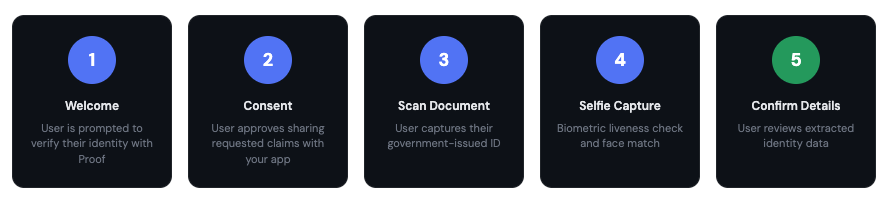
The user sees the following screens during this flow:
| Step | Screen | Description |
|---|---|---|
| 1 | Welcome | User is prompted to verify their identity with Proof |
| 2 | Consent | User approves sharing requested claims with your app and approves any transaction data |
| 3 | Scan Document | User captures their government-issued ID |
| 4 | Selfie Capture | Biometric liveness check and face match |
| 5 | Confirm Details | User reviews extracted identity data |
Behind the scenes, Proof chains together credential issuance (OIDC4VCI) and credential presentation (OIDC4VP) automatically. The user completes identity verification, a credential is issued to their cloud wallet, and the presentation is generated — all within a single redirect flow.
Path B: Returning User (Already Verified)
If the user already has a credential in their Proof cloud wallet, the flow is much faster. They authenticate with their biometrics, review the consent screen, and the presentation is returned immediately.
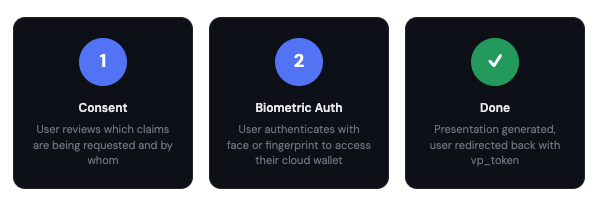
The returning user sees fewer screens:
| Step | Screen | Description |
|---|---|---|
| 1 | Consent | User reviews which claims are being requested and by whom |
| 2 | Selfie Capture | Biometric liveness check and face match |
| 3 | Done | Presentation generated, user redirected back with vp_token |
For the developer: Your integration code is identical for both paths. You redirect the user to
/authorizewith the same parameters, and you receive the samevp_tokenresponse at your callback. The only difference is user-facing — how long the process takes and what screens they see.
Supported Credential Types
| Credential Type (vct) | Description | Available Claims |
|---|---|---|
https://credentials.notarize.com/ProofCredentialV1 | Full identity credential issued after Identify verification | given_name, family_name, birthdate, age_equal_or_over.18, age_equal_or_over.21, age_equal_or_over.65 |
Updated 5 months ago